class: left, top, title-slide .title[ # Geospatial Data<br>Geospatial Representations ] .author[ ### Keith VanderLinden<br>Calvin University ] --- # Example .pull-left[ ```r library(leaflet) popup = c("Calvin", "CU", "ITRI", "CSIRO") leaflet(width = 500, height = 500) %>% addProviderTiles( "NASAGIBS.ViirsEarthAtNight2012" ) %>% addMarkers( lng = c(-85.67, -105.27, -0.15, 151.20), lat = c(42.96, 40.01, 50.82, -33.86), popup = popup ) %>% addPolylines( lng = c(-180.0, 180.0), lat = c(0.0, 0.0), weight = 1, color = "red" ) %>% addPolylines( lng = c(0.0, 0.0), lat = c(-90.0, 90.0), weight = 1, color = "red" ) ``` ] .pull-right[ <div id="htmlwidget-8f836166d559454ecd73" style="width:500px;height:500px;" class="leaflet html-widget "></div> <script type="application/json" data-for="htmlwidget-8f836166d559454ecd73">{"x":{"options":{"crs":{"crsClass":"L.CRS.EPSG3857","code":null,"proj4def":null,"projectedBounds":null,"options":{}}},"calls":[{"method":"addProviderTiles","args":["NASAGIBS.ViirsEarthAtNight2012",null,null,{"errorTileUrl":"","noWrap":false,"detectRetina":false}]},{"method":"addMarkers","args":[[42.96,40.01,50.82,-33.86],[-85.67,-105.27,-0.15,151.2],null,null,null,{"interactive":true,"draggable":false,"keyboard":true,"title":"","alt":"","zIndexOffset":0,"opacity":1,"riseOnHover":false,"riseOffset":250},["Calvin","CU","ITRI","CSIRO"],null,null,null,null,{"interactive":false,"permanent":false,"direction":"auto","opacity":1,"offset":[0,0],"textsize":"10px","textOnly":false,"className":"","sticky":true},null]},{"method":"addPolylines","args":[[[[{"lng":[-180,180],"lat":[0,0]}]]],null,null,{"interactive":true,"className":"","stroke":true,"color":"red","weight":1,"opacity":0.5,"fill":false,"fillColor":"red","fillOpacity":0.2,"smoothFactor":1,"noClip":false},null,null,null,{"interactive":false,"permanent":false,"direction":"auto","opacity":1,"offset":[0,0],"textsize":"10px","textOnly":false,"className":"","sticky":true},null]},{"method":"addPolylines","args":[[[[{"lng":[0,0],"lat":[-90,90]}]]],null,null,{"interactive":true,"className":"","stroke":true,"color":"red","weight":1,"opacity":0.5,"fill":false,"fillColor":"red","fillOpacity":0.2,"smoothFactor":1,"noClip":false},null,null,null,{"interactive":false,"permanent":false,"direction":"auto","opacity":1,"offset":[0,0],"textsize":"10px","textOnly":false,"className":"","sticky":true},null]}],"limits":{"lat":[-90,90],"lng":[-180,180]}},"evals":[],"jsHooks":[]}</script> ] ??? - The lat/long data are floats, but their meaning is based on geospatial relationships. - The satellite image is raster data from https://wiki.earthdata.nasa.gov/display/GIBS/GIBS+API+for+Developers#GIBSAPIforDevelopers-TimeDimension. - The points are vector data representing the equator, the prime meridian, and a few sites of interest. - Cf. Google Maps with "satellite view" (except at night). --- # GeoSpatial Data .pull-left[ Geospatial data are numerical but the numbers carry spatial meaning. These data come in two basic forms: - *Raster* data represent sensory data using two-dimensional arrays of cells of fixed size. - *Vector* data represent geometric features using points, lines and polygons. We will primarily focus on the latter. .footnote[Images from [DataCarpentry](https://datacarpentry.org/organization-geospatial/) & [R. Lovelace et al](https://geocompr.robinlovelace.net).] ] -- .pull-right[ Raster Primitives 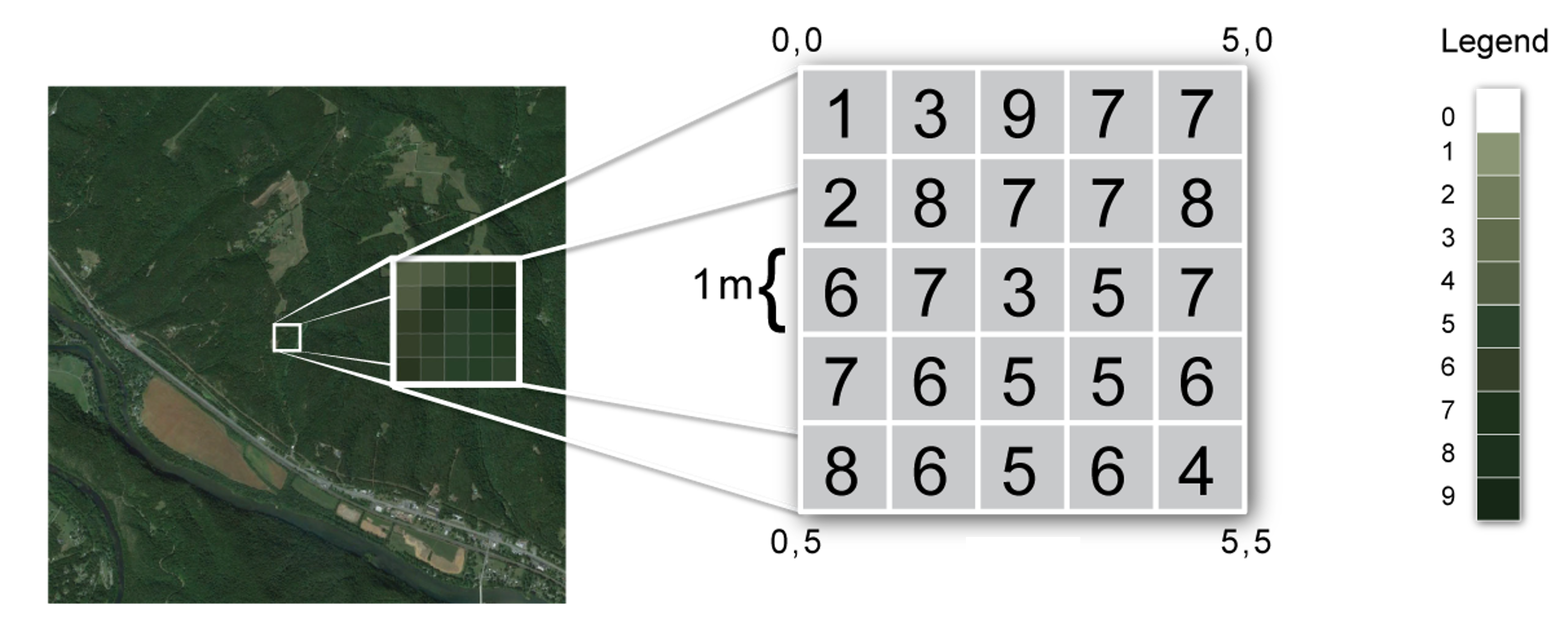 Vector 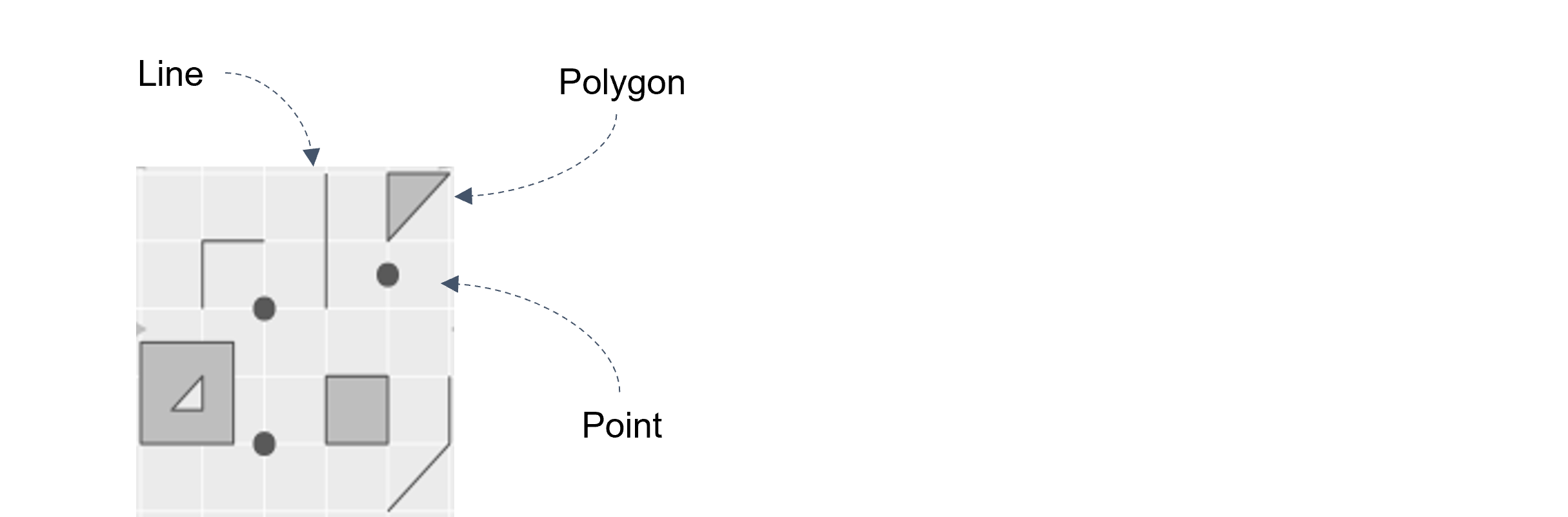 ] ??? - Raster data are used for images (and other sensing devices). - The images comprise 2D arrays of pixels (grid cells), each with a set color (or other sensory value). - They're good for continuous features. - They're commonly used in environmental sciences, where remote sensor data matters. - Vector data are precise and are used for locations, boundaries, ... - These data use coordinates to specify points/lines/polygons,, e.g., multipolygons for geographical objects, e.g., Indonesia. - They're good for features with discrete boundaries. - They're commonly used in the social sciences, where political borders matter. - Don't confuse geospatial vector data with R vectors. - Related terms: GIS (1960s), GeoInformatics --- # Raster Data The [`terra` library](https://rspatial.github.io/terra/) supports raster images. .pull-left[ ```r library(terra) library(spDataLarge) zion_raster <- rast( system.file( "raster/srtm.tif", package = "spDataLarge" ) ) plot(zion_raster) ``` ] .pull-right[ Zion National Park Area Elevation <img src="data_files/figure-html/unnamed-chunk-4-1.png" width="90%" style="display: block; margin: auto;" /> ] ??? - So does the older `raster` library. --- # Vector Data The [`sf` library](https://r-spatial.github.io/sf/index.html) supports vector data. .pull-left[ ```r library(sf) zion_vector <- read_sf( system.file( "vector/zion.gpkg", package = "spDataLarge" ) ) plot(st_geometry(zion_vector["REGION"])) ``` ] .pull-right[ Zion National Park Boundary <img src="data_files/figure-html/unnamed-chunk-5-1.png" width="90%" style="display: block; margin: auto;" /> ] ??? - So do the older `sp`, `rgeos`, & `rdal` libraries. - SF stands for "Simple Features" or, perhaps more appropriately, "Spatial data Frames" - `sf` treats geospatial objects as regular dataframes and integrates with the tidyverse. - `plot`ing an `sf` object displays a map. --- # Combining Raster and Vector Data It’s often useful to combine raster and vector data. .pull-left[ ```r # Unify the coordinate reference systems. zion_vector_wgs84 <- zion_vector %>% st_transform(crs(zion_raster)) # Mask out zion_raster_cropped <- zion_raster %>% mask(vect(zion_vector_wgs84)) plot(zion_raster_cropped) ``` ] .pull-right[ Zion National Park Elevation <img src="data_files/figure-html/unnamed-chunk-6-1.png" width="90%" style="display: block; margin: auto;" /> ] ??? - We convert `zion` to the CRS of the `srtm` dataset (`crs(srtm)` - WGS84, aka EPSG4326 - used by GPS & GoogleEarth). - Open [the combined image](http://vps58738.lws-hosting.com/Teaching/RSIG/Cours/_book/_main_files/figure-html/srtmZion-1.png) in a photo editor and show how the raster pixelates when zoomed but not the vector data. - References: - https://geocompr.robinlovelace.net/raster-vector.html