class: left, top, title-slide .title[ # Wrangling 2<br>Multiple-Table Data Wrangling ] .author[ ### Keith VanderLinden<br>Calvin University ] --- # Multiple-Table Data Wrangling with dplyr .pull-left[ `dplyr`, Tidyverse’s data manipulation package, provides a *grammar* of *multiple-table* data manipulation “verbs” implemented as functions: - `inner_join()` - `left_join()` - `right_join()` - `full_join()` These functions integrate with the tidyverse as the single-table functions did. ] .pull-right[  ] ??? - This unit focuses on multiple-table wrangling. --- # Dataset: Women in Science We’d like to work with this dataset of female scientists (taken from [Meet 10 Women in Science Who Changed the World](https://www.discovermagazine.com/the-sciences/meet-10-women-in-science-who-changed-the-world)) with the goal of merging related information from multiple tables. .pull-left[ ```r notability <- read_csv("data/notability.csv") glimpse(notability) professions <- read_csv("data/professions.csv") glimpse(professions) dates <- read_csv("data/dates.csv", col_types = cols( birth_year = col_integer(), death_year = col_integer()) ) glimpse(dates) ``` ] .pull-right[ ``` Rows: 9 Columns: 2 $ name <chr> "Ada Lovelace", "Marie Curie", "Janaki Ammal"… $ known_for <chr> "first computer algorithm", "theory of radioa… ``` ``` Rows: 10 Columns: 2 $ name <chr> "Ada Lovelace", "Marie Curie", "Janaki Ammal… $ profession <chr> "Mathematician", "Physicist and Chemist", "B… ``` ``` Rows: 8 Columns: 3 $ name <chr> "Janaki Ammal", "Chien-Shiung Wu", "Katherin… $ birth_year <int> 1897, 1912, 1918, 1920, 1928, 1930, 1947, 19… $ death_year <int> 1984, 1997, 2020, 1958, 2016, NA, NA, NA ``` ] ??? - This dataset is a toy database with multiple tables. - It's not uncommon to have different data about single entities distributed over multiple datasets. --- # Dataset: Multiple Tables .panelset[ .panel[.panel-name[professions] ``` # A tibble: 10 × 2 name profession <chr> <chr> 1 Ada Lovelace Mathematician 2 Marie Curie Physicist and Chemist 3 Janaki Ammal Botanist 4 Chien-Shiung Wu Physicist 5 Katherine Johnson Mathematician 6 Rosalind Franklin Chemist 7 Vera Rubin Astronomer 8 Gladys West Mathematician 9 Flossie Wong-Staal Virologist and Molecular Biologist 10 Jennifer Doudna Biochemist ``` ] .panel[.panel-name[dates] ``` # A tibble: 8 × 3 name birth_year death_year <chr> <int> <int> 1 Janaki Ammal 1897 1984 2 Chien-Shiung Wu 1912 1997 3 Katherine Johnson 1918 2020 4 Rosalind Franklin 1920 1958 5 Vera Rubin 1928 2016 6 Gladys West 1930 NA 7 Flossie Wong-Staal 1947 NA 8 Jennifer Doudna 1964 NA ``` ] .panel[.panel-name[notability] ``` # A tibble: 9 × 2 name known_for <chr> <chr> 1 Ada Lovelace first computer algorithm 2 Marie Curie theory of radioactivity, discovery of elem… 3 Janaki Ammal hybrid species, biodiversity protection 4 Chien-Shiung Wu confim and refine theory of radioactive bet… 5 Katherine Johnson calculations of orbital mechanics critical … 6 Vera Rubin existence of dark matter 7 Gladys West mathematical modeling of the shape of the E… 8 Flossie Wong-Staal first scientist to clone HIV and create a m… 9 Jennifer Doudna one of the primary developers of CRISPR, a … ``` ] .panel[.panel-name[Desired Output] ``` # A tibble: 10 × 5 name profession birth…¹ death…² known…³ <chr> <chr> <int> <int> <chr> 1 Ada Lovelace Mathematician NA NA first … 2 Marie Curie Physicist and Chem… NA NA theory… 3 Janaki Ammal Botanist 1897 1984 hybrid… 4 Chien-Shiung Wu Physicist 1912 1997 confim… 5 Katherine Johnson Mathematician 1918 2020 calcul… 6 Rosalind Franklin Chemist 1920 1958 <NA> 7 Vera Rubin Astronomer 1928 2016 existe… 8 Gladys West Mathematician 1930 NA mathem… 9 Flossie Wong-Staal Virologist and Mol… 1947 NA first … 10 Jennifer Doudna Biochemist 1964 NA one of… # … with abbreviated variable names ¹birth_year, ²death_year, # ³known_for ``` ] ] .footnote[The `name` column is the *primary key* for all of these tables.] ??? - To achieve the desired output, we can't just paste the tables together, either vertically or horizontally. The lines have to be *joined* with respect to the name field value. - The `name` field is the *primary key* value, which indicates that it uniquely identifies a row in the table. Thus, the desired output only includes the primary key value once, because it's the same in all the rows that are combined. --- # The Join Operation .pull-left[ *Joining* two tables “matches up” records from the two tables (e.g., `X` & `Y`) based on matching *key* values. ``` # A tibble: 3 × 2 key xdata <dbl> <chr> 1 1 x1 2 2 x2 3 3 x3 ``` ``` # A tibble: 3 × 2 key ydata <dbl> <chr> 1 1 y1 2 2 y2 3 4 y4 ``` ] .pull-right[ 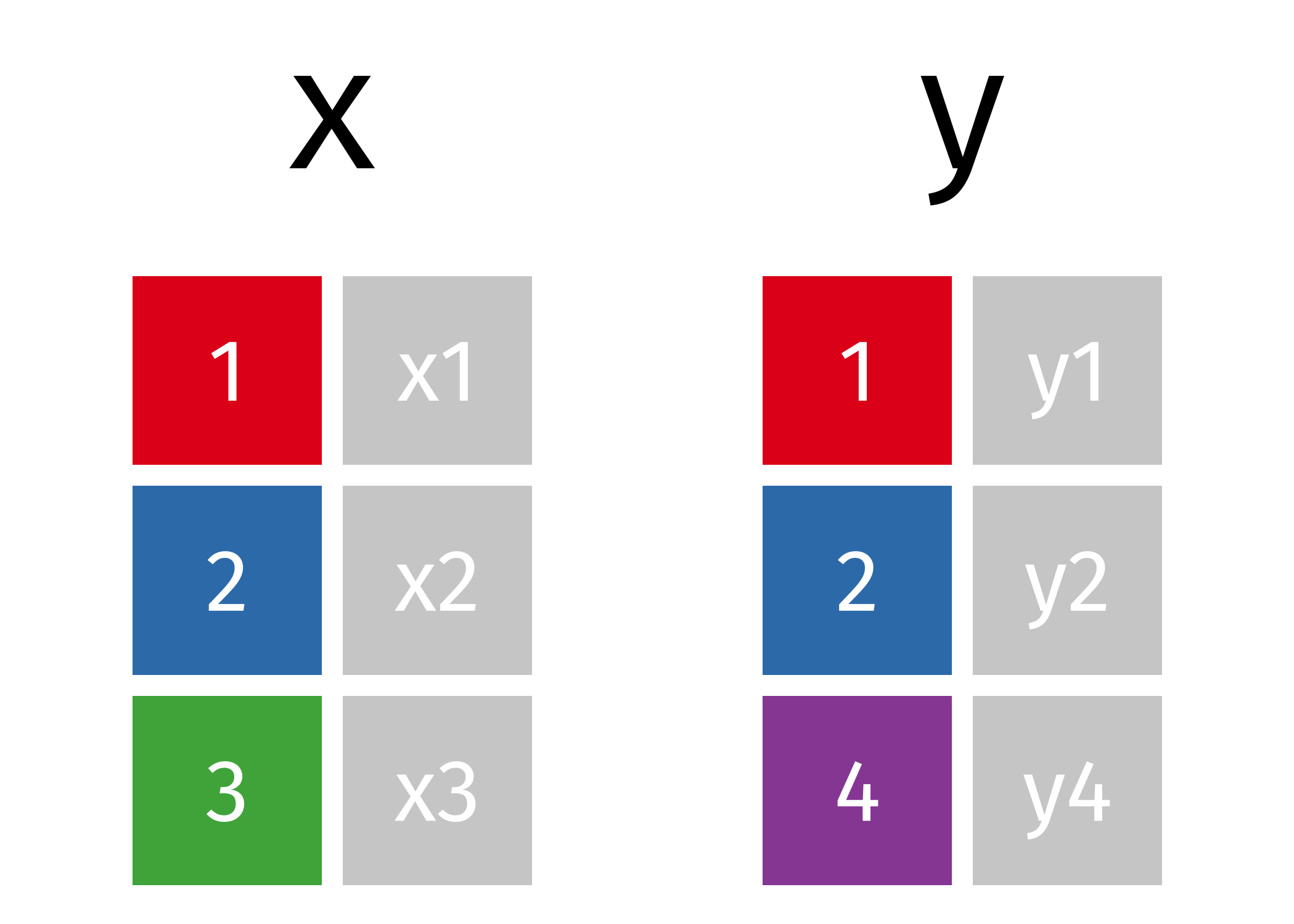 ] .footnote[Images from: TidyExplain, https://github.com/gadenbuie/tidyexplain] ??? Briefly describe the desired output of each with respect to the sample tables. - *Inner Join* --- Drops rows that don't have matching *key* values. - *Left Join* --- Fills in `NA` values where the left row has no match. - *Right Join* --- This is the reverse of the left join. - *Full (aka. Outer) Join* --- Fills in `NA` values for all unmatched rows. References - Relational databases & SQL - https://r4ds.had.co.nz/relational-data.html#understanding-joins --- # Inner Join .pull-left[ ```r inner_join(x, y, by = "key") ``` ``` # A tibble: 2 × 3 key xdata ydata <dbl> <chr> <chr> 1 1 x1 y1 2 2 x2 y2 ``` ] .pull-right[ 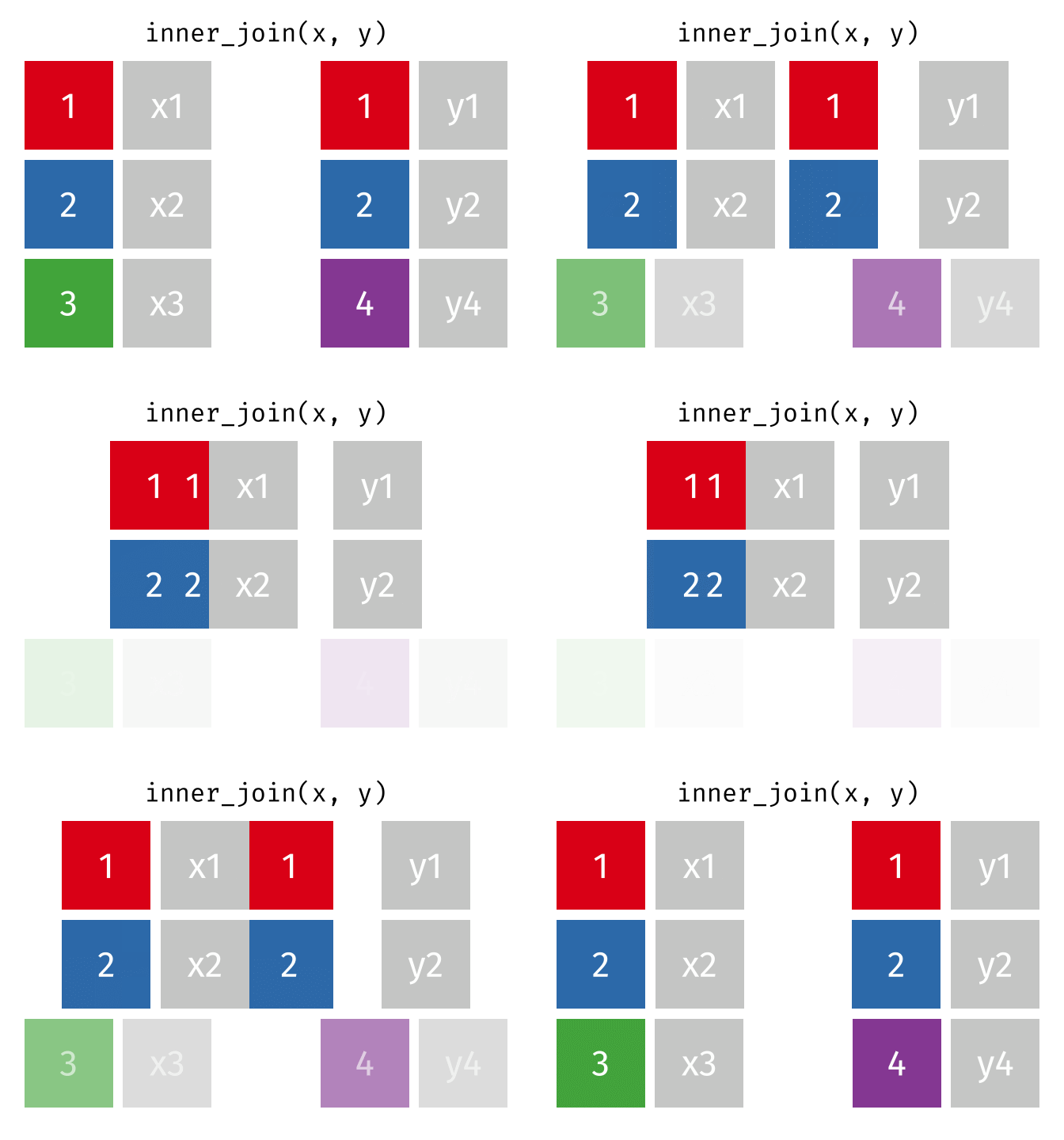 ] ??? --- # Left Join .pull-left[ ```r left_join(x, y, by = "key") ``` ``` # A tibble: 3 × 3 key xdata ydata <dbl> <chr> <chr> 1 1 x1 y1 2 2 x2 y2 3 3 x3 <NA> ``` ] .pull-right[ 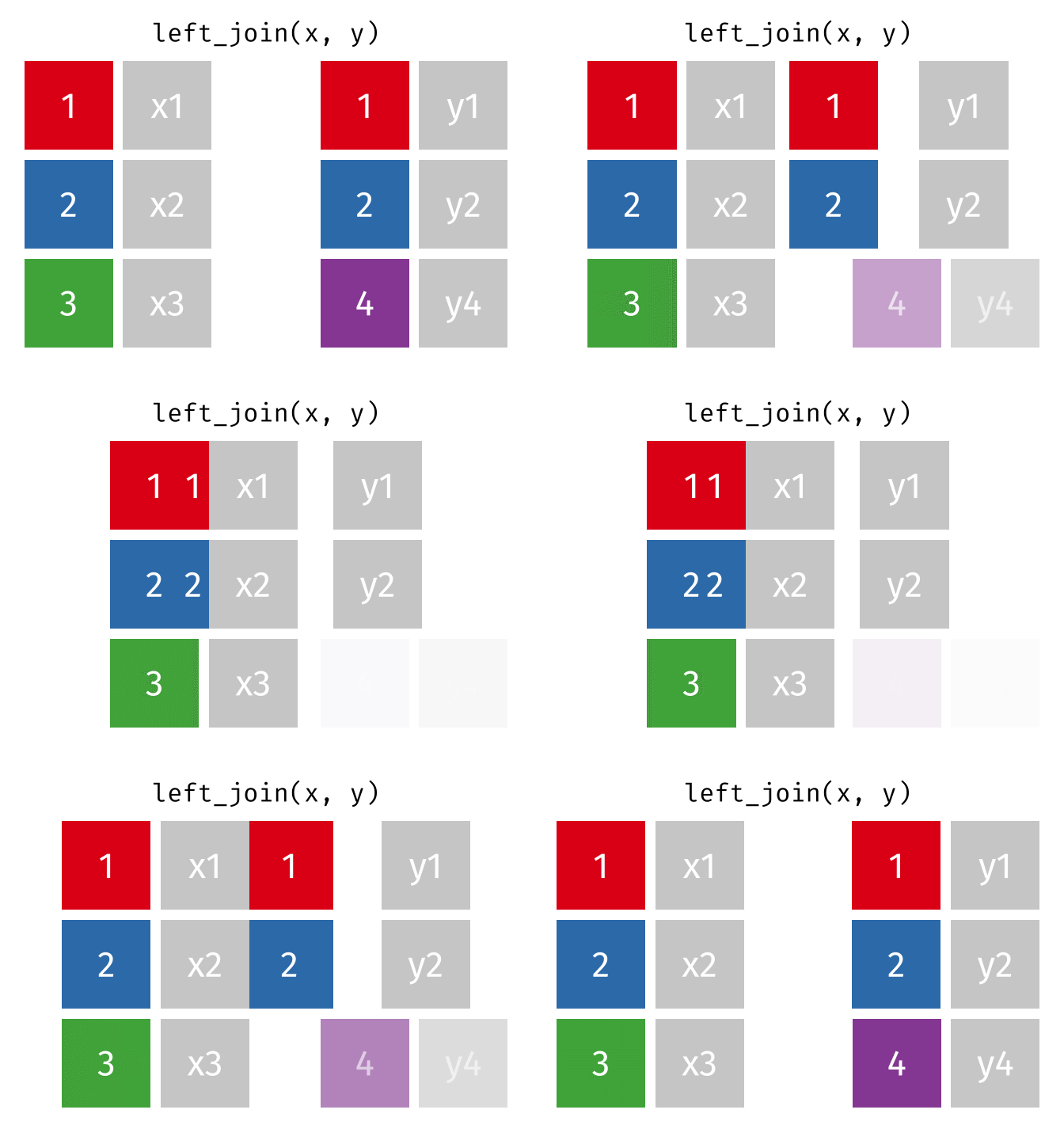 ] ??? The left join is an inner join that adds `NA` for fields of unmatched records from the left (i.e., the first) table. --- # Right Join .pull-left[ ```r right_join(x, y, by = "key") ``` ``` # A tibble: 3 × 3 key xdata ydata <dbl> <chr> <chr> 1 1 x1 y1 2 2 x2 y2 3 4 <NA> y4 ``` ] .pull-right[ 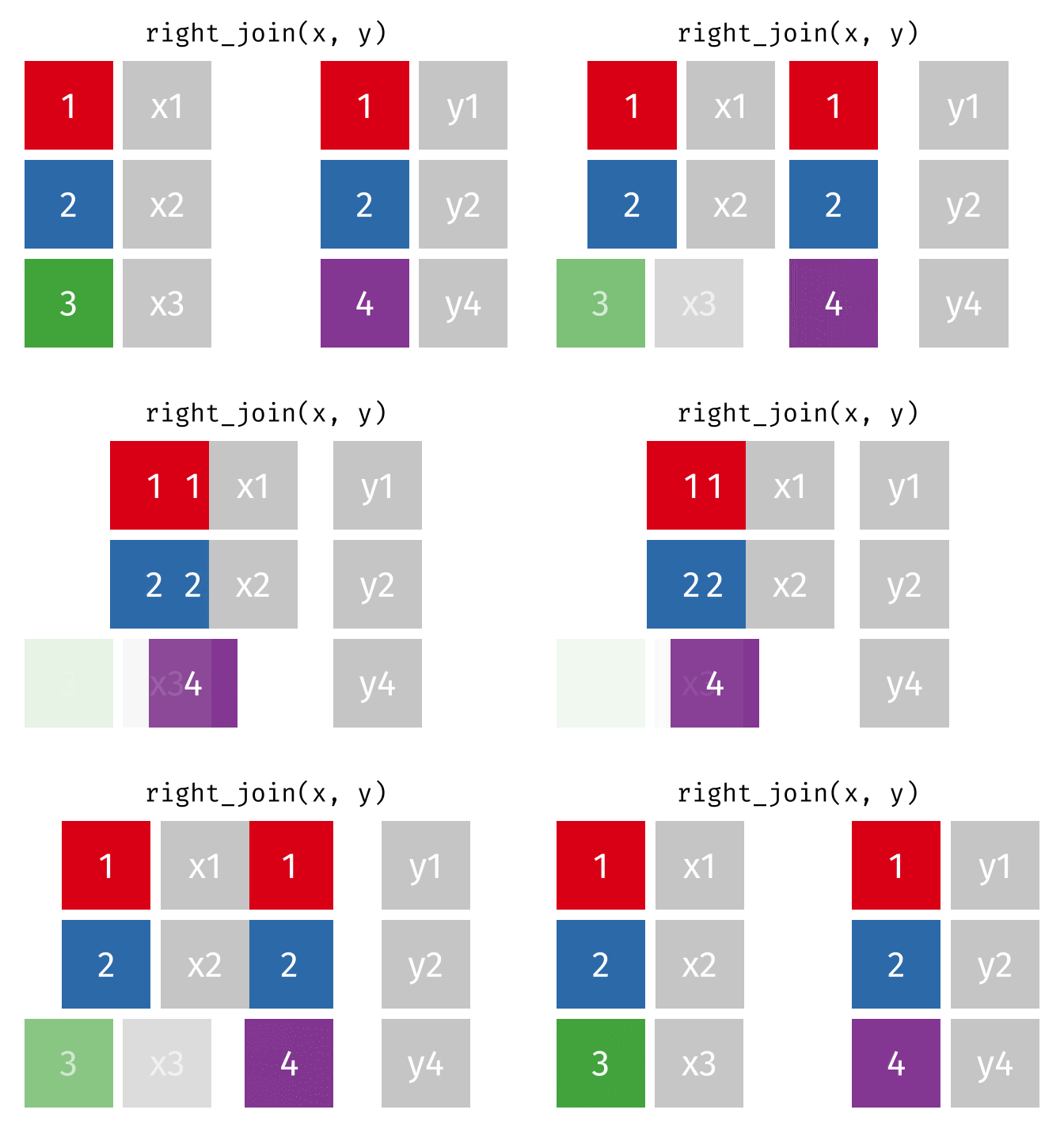 ] ??? --- # Full (aka. Outer) Join .pull-left[ ```r full_join(x, y, by = "key") ``` ``` # A tibble: 4 × 3 key xdata ydata <dbl> <chr> <chr> 1 1 x1 y1 2 2 x2 y2 3 3 x3 <NA> 4 4 <NA> y4 ``` ] .pull-right[  ] ??? --- # Example: Women in Science ```r professions %>% left_join(dates, by = "name") %>% left_join(notability, by = "name") ``` ``` # A tibble: 10 × 5 name profession birth…¹ death…² known…³ <chr> <chr> <int> <int> <chr> 1 Ada Lovelace Mathematician NA NA first … 2 Marie Curie Physicist and Chem… NA NA theory… 3 Janaki Ammal Botanist 1897 1984 hybrid… 4 Chien-Shiung Wu Physicist 1912 1997 confim… 5 Katherine Johnson Mathematician 1918 2020 calcul… 6 Rosalind Franklin Chemist 1920 1958 <NA> 7 Vera Rubin Astronomer 1928 2016 existe… 8 Gladys West Mathematician 1930 NA mathem… 9 Flossie Wong-Staal Virologist and Mol… 1947 NA first … 10 Jennifer Doudna Biochemist 1964 NA one of… # … with abbreviated variable names ¹birth_year, ²death_year, # ³known_for ``` .footnote[The `name` field is used to join records. In cases where the field names don’t match, we use `key = c("key_name_table1", "key_name_table2")` to specify the key names in the first and second tables respectively.] ??? - Joins are based on *key values*. Because the key column names are the same (i.e., `name`), we don't need to specify them (i.e., we can use the *natural* join). We'll address more general foreign keys in the demo. - But it's important to remind ourselves how the *relationships* between table rows are specified, so I generally include the key match specification anyway (i.e., `key = c("name", "name")`). - *Key* values are generally unique, in which case they are called *primary keys*, but they don't have to be. See the next example. --- # Left Join - Multiple Matches .pull-left[ ```r left_join(x, y_extra, by = "key") ``` ``` # A tibble: 4 × 3 key xdata ydata <dbl> <chr> <chr> 1 1 x1 y1 2 2 x2 y2 3 2 x2 y5 4 3 x3 <NA> ``` ] .pull-right[  ] ??? Here, the Y table has an extra matching record for the key value 2. --- # Example: Women in Science with Multiple Matches .pull-left[ ```r notability_multi <- read_csv("data/notability-multi.csv") notability_multi professions_multi <- read_csv("data/professions-multi.csv") professions_multi # The dates dataset doesn't change. ``` ] .pull-right[ ``` # A tibble: 13 × 2 name known_for <chr> <chr> 1 Ada Lovelace first computer algorithm, 2 Marie Curie theory of radioactivity, 3 Marie Curie discovery of elements polonium and radium, 4 Marie Curie first woman to win a Nobel Prize, 5 Janaki Ammal hybrid species, ... ``` ``` # A tibble: 12 × 2 name profession <chr> <chr> 1 Ada Lovelace Mathematician 2 Marie Curie Physicist 3 Marie Curie Chemist 4 Janaki Ammal Botanist 5 Chien-Shiung Wu Physicist ... ``` ] ??? - This is the same basic structure, but there are more than one matching foreign key values. - In this case, `name` is not a primary key. Tables do not have to have primary keys. --- # Example: Women in Science with Multiple Matches ```r *professions_multi %>% left_join(dates, by = "name") %>% * left_join(notability_multi, by = "name") ``` ``` # A tibble: 18 × 5 name profession birth_year death_year known_for <chr> <chr> <int> <int> <chr> 1 Ada Lovelace Mathematician NA NA first compute… 2 Marie Curie Physicist NA NA theory of rad… 3 Marie Curie Physicist NA NA discovery of … 4 Marie Curie Physicist NA NA first woman t… 5 Marie Curie Chemist NA NA theory of rad… 6 Marie Curie Chemist NA NA discovery of … # … with 12 more rows ``` ??? - Ada Lovelace still only has one row; she didn't have multiple, matching records. - Marie Curie now has multiple rows, one for each combination of the multiple, matching records (i.e., it's the cross product of the sets of matching records).