class: left, top, title-slide .title[ # Wrangling 1<br>Single-Table Data Wrangling ] .author[ ### Keith VanderLinden<br>Calvin University ] --- # Data Wrangling .pull-left[ Though not explicitly named in the standard data science workflow (shown on the right), the process of distilling information from data generally includes: 1. Data *Cleansing* 2. Data *Tidying* 3. Data *Wrangling* All three steps are generally necessary, but, given the unreliability and inconsistency of “raw” data, the first step can be considerable. ] .pull-right[ The Data Science Workflow 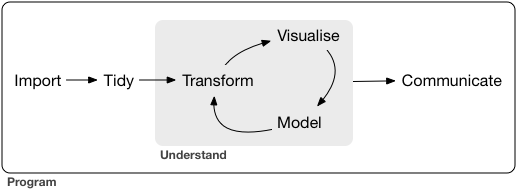 .footnote[Image from: https://r4ds.had.co.nz/introduction.html] ] ??? - *Wrangling* is often used in the general sense in which `wrangling = import + tidy + transform`. - In this unit, following the text, uses a more specific sense in which: - `wrangle = transform` - "manipulating" the content of tidied datasets (cf. "slicing & dicing" vegetables) - `tidy = tidy` - "normalizing" the structure of imported/cleansed data (cf. "organizing" the vegetables) - `cleanse = import` - "collecting/importing" data from original sources (cf. "harvesting/cleaning" vegetables) - We do these in reverse order, saving the harvesting until specialized sections on specific types of data (relational, text, geospatial). - In many (most?) projects, these tasks take more time and effort than the actual analysis. --- # Single-Table Data Wrangling with dplyr .pull-left[ `dplyr`, Tidyverse’s data manipulation package, provides a *grammar* of data manipulation “verbs” implemented as functions: - `select()` - `filter()` - `summarise()` - `mutate()` - `arrange()` `dplyr` functions: 1. Receive a dataframe. 2. Perform a well-specified operation on that dataframe. 3. Return a new, modified dataframe. ] .pull-right[  ] ??? These functions allow us to slice, dice, blend the data: - `select()` picks columns based on their names. (Ken would have preferred the name `select_cols`). - `filter()` picks rows based on their values. (Ken would have preferred the name `select_rows`.) - `summarise()` aggregates multiple cells into single summary values. - `mutate()` adds new columns that are functions of existing columns. (Ken would have preferred the name `change_column` or `add_column`.) - `arrange()` changes the ordering of the rows. Notes: - dplyr functions never *modify* dataframes. - Ken notes that these operations are *vectorized*, i.e., they run on the entire column at once. Returning a new dataframe means that these are *pure* functions that inter-operate with the tidyverse using *pipelines*. Note that `mutate()` doesn't actually mutate anything; it's a pure function. Ken prefers `rename()`. We now demo the `dplyr` functions.