Development Containers
Keith VanderLinden
Containers
Containers are development environments that bundle the:
Python virtual environment, interpreter, and tools
Data files and file structures
System tools and configuration
Operating system
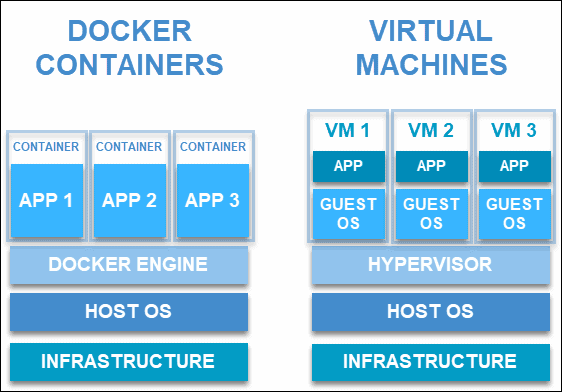
They’re reproducible and isolated . Docker is a common container implementation, see: MwML’s container architecture diagram .
We’ll now be moving from scripts running on a local CLI to containers running our scripts wherever we need to run them (e.g., in the cloud), because local environments:
Are hard to configure, even with carefully-managed installation scripts (q.v., C. Huyen’s Python version issues, p. 306; CCEL’s Web/DBMS issues).
Have limited storage and compute resources.
Containers bundle development environments, which goes beyond Python virtual environments in that they also include (in order of decreasing system level):
Python itself (e.g., the version)
System tools/utilities (e.g., DBMSs) & configuration (e.g., users, security settings)
The operating system (shared with the host OS)
Containers are:
Reproducible in that they are built from a specification (i.e., a Dockerfile).
Isolated in that they are separate from the underlying host system and from other containers.
As such, they implement a standardized development environment. See the MwML diagram. N.b., containers:
don’t specify the storage & compute infrastructure.
“share” the OS with the host system (cf. VMs).
don’t use Python Venvs because they have exactly one version of Python installed, i.e., they’re already isolated.
References
Docker
In Docker, Docker files are run to create Docker images , which are then run in Docker containers .
The docker logo is a whale carrying containers, which is a pretty good metaphor.
The whale is mostly just cute, but …
The shipping container revolutionized global trade in a manner similar to the way that containers have revolutionized software development/deployment.
Docker (a PaaS tool) terms:
File : A script that specifies how to build a Docker image (e.g., DMLS and SLO docker files)Image : An immutable snapshot of everything required to run a system. N.b., images can be layered.Container : A mutable instance of a Docker image running in Docker.
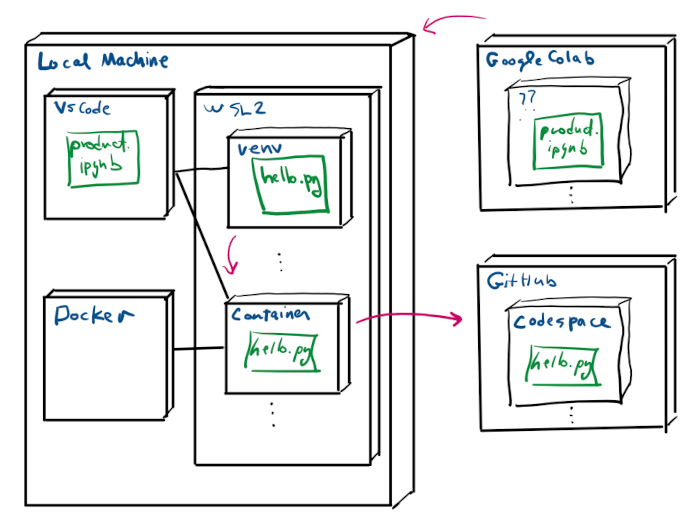
Add a local Docker/dev-container to the deployment diagram (from module 4).
References
Containers vs. Virtual Machines
Both containers and virtual machines (VMs) are virtualization technologies, which separate applications from the underlying storage and compute infrastructure.
Containers share the host OS kernel, which makes them faster and more lightweight.VMs have their own separate OS kernel, which makes them more secure.
See PhoenixNAP’s container vs VM diagram .
E.g., Docker and WSL2 are both virtualization technologies, but:
Docker implements containers.
WSL2 implements something that closer to (but not fully) a VM.
Containers are:
Lightweight (i.e., MBs) because they share the host OS kernel.
Fast because they don’t need to boot an OS.
Less secure because they share the host OS kernel.
better for bundling DS applications and migrating them to the (PaaS) cloud.
VMs are:
Heavier (i.e., GBs) because they have their own OS kernel.
Slower because they need to boot an OS.
More secure because they have their own OS kernel.
better for sandboxed apps requiring stronger isolation and security.
References
Development Containers
Development Containers (DevContainers) bundle Docker containers with development tools so that we can run our development environment on:
Our local machine in VSCode.
The cloud in a GitHub Codespace .
Codespaces allow us to mirror our local development infrastructure on GitHub, which will streamline our workflow (n.b., C. Huyen’s company uses them for this purpose).
We’ll demo them in some detail later.
Add a GitHub-Codespace managed dev-container to the deployment diagram.
References
Development Infrastructure
See the live walkthrough.
Link a snapshot of the final state of the deployment diagram here, which we’ll revisit throughout the demo.