The purpose of today's lab is to practice using strings, lists,
dictionaries and tuples. There are 4 components:
- Learn about the slice operator to manipulate strings
- Sort a list using a minimal set of list operations
- Practice using dictionaries for associative relationships
- Use tuples to describe a line in a turtle graphics program
Begin by creating a new folder for today's lab called lab03.
Slice
This exercise will make use of Python string and list slicing.
For the purposes of this exercise, you can use simple character
indexing and the following for character range access.
my_string[start_index: end_index]
— This gets the substring from position start_index
up to (but not including) position end_index. E.g., 'test'[1:3]
returns 'es'.
Slicing is covered in some detail in Chapter 7.
Exercise 3.1 Years ago, a Calvin login id
was made up of the first letter of a student's first name, the first 5
letters of their last name, and the last 2 digits of their student
number. Write an interactive program in a file called
login.py
to generate a person's login id. Use the following algorithm:
- Prompt for and store the first name
- Prompt for and store the last name (assume
that last names have no spaces)
- Prompt for and store the student number.
For our purposes, should this be an int or a string?
- Compute the login id. Note: you can use
login
					= login.lower()
to create an id that has all lowercase letters.
- Print the login id.
Your solution must involve at least 2 slice operations: One to
compute the appropriate piece of the last name, and another to
compute the last 2 digits of the student id number. Be sure to test
your program using last names with fewer and more than 5 letters!
Basic Lists
A python list is a very powerful data structure with an
extensive API. However, at this early juncture of the course, we want
to solidify a few basic operations instead of spending our time
perusing the API looking for methods and/or functions that we hope
exist.
Exercise 3.2 Create a file called
sorting.py
that allows the user to enter 4 numbers and stores these numbers in a
list. The program will then create and print a new list with the same
numbers in sorted order (from min to max).
- Prompt the user for each number in turn (i.e. “Please
enter number 1: ”, “Please enter number 2: ” etc.)
- The only functions on lists and list methods you may use
are:
- append()
- min()
- max()
- remove()
- pop()
- len()
- +
Begin by writing an
algorithm as a comment
in your file. Then implement your algorithm using valid Python
commands.
Working with dictionaries
Dictionaries are also useful data structures.
Exercise 3.3 Create a file called
dict_practice.py
. Within this file write commands implement the following algorithm:
- Create a dictionary called
scoreDict
that has the names “Joe”, “Tom”,
“Barb”, “Sue”, “Sally”
associated with the scores 10, 23, 13, 19 and 12 respectively.
- Using
scoreDict, print an
expression that computes Barb’s score.
- Update the score for Sally to be 13.
- Tom just dropped the course. Delete Tom and
his score from scoreDict.
- Print the resulting dictionary.
User described line (with tuples!)
At this point, we don't have a terribly compelling reason to use
tuples, but we can certainly practice using the syntax!
There are 3 new turtle methods that will be helpful today:
hideturtle(): Tells the turtle to hide the arrow
that is usually on the screen. Hiding the turtle generally increases
the speed of the animation.goto(): Tells the turtle to go directly to the
specified location. The location given may be a tuple.write(): Tells the turtle to write the specified
string to the screen at its current location. An optional second keyword
argument allows the user to specify characteristics of the font:
font=(<font_name>, <font_size>,
				<font_descriptor>)
You can see the documentation
(with an example) here: Write documentation
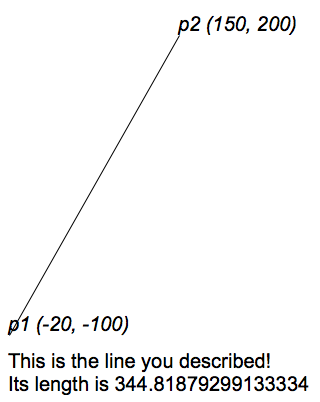
Exercise 3.4
In this exercise you will use turtle graphics
to draw a line with end points specified by the user. You will also
show the values of the coordinates and the length of the line.
Create a file called turtleLine.py, updated the
documentation appropriately, and then proceed roughly as follows
(you'll need to fill in some details):
- import the turtle and math modules.
- Prompt for and store values for x1,
y1, x2 and y2 values
- Create tuples
point1 and point2
that represent the two points entered by the user.
- Create a window and turtle with which to draw, and hide
the arrowhead of the turtle.
- Use
goto() to move the turtle to the first
point.
- Use
write() to describe the first point. Use
an italic Arial font with size 20.
- Draw a line from the first point to the
second.
- Describe the second point.
- Draw the caption. Note: The caption
should always be aligned with the left-most point and below the
lowest point, left justified and must include
the length of the line.
|
 |
Checking In
We will grade these exercises according to the following
criteria:
- Correctness:
- 20% - Exercise 1: Login id generation works as described
- 25% - Exercise 2:
- 10% - Algorithm description
- 15% - List basics creates a sorted list using only
allowable methods/functions
- 15% - Exercise 3: Dictionary commands are followed as
specified.
- 30% - Exercise 4: turtleLine works as described.
- Understandability:
- 5% - Header Documentation - Document the code’s basic
purpose, authors and assignment number.
- 5% - Code Documentation - Separate the logical blocks of
your programs with useful comments and white space.
Submit your solutions to these lab exercises using your
appropriate submission environment.
If you worked with a partner, make sure you both have a copy of
the files.
If you’re working on a lab computer, don’t forget to
log off of your machine when you are finished!