


Students who complete this lab will demonstrate that they can:
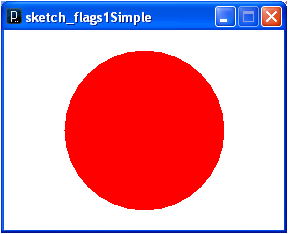
Nations and other entities have flags, and they frequently specify the layout of their flag very carefully. Can you guess which of the following sketches of a Japanese flag is (or are) the most accurate model(s)?
Consider which of these flags conforms to the specification of the Japanese flag? People are pretty good at graphical discernment tasks like this one, so it’s important to have the ratios and scaling done properly. This requires the use of types and expressions.
With types and expressions, you can write a program that encapsulates the key shapes of the Japanese flag, their colors, and their geometric inter-relationships. The only given value that the program would need is the intended size of the flag drawing (say the unit size for a flag on a 3-unit by 2-unit canvas). Such a program would implement a concise pattern or plan, commonly called a model, for a regulation Japanese flag.
Processing is designed for programming images and animations, but it does provide a text pane for simple console output. You can find the console output in the black text pane at the bottom of the Processing IDE.
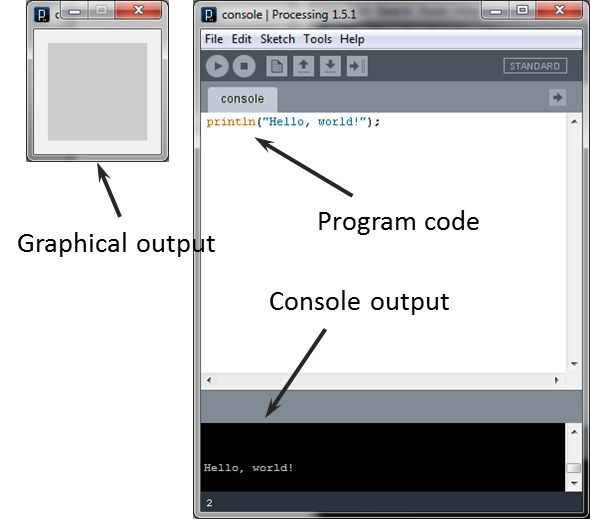
Text output can be helpful in debugging and is used throughout these lab exercises. You can use
the
println()
statement to print out any expression (e.g., here it prints out the literal string expression
"Hello, world!"
). The general pattern is as follows:
println(expression);
For each of the following exercises, record your code (as executable statements) and your short
(1-line!) written answers (as comments) in one code file for each exercise (i.e., one for exercise
1, another for 2, etc.). Note that, as with last week, it is a good idea to create a
lab03
directory in your course directory now and then save all your programs for this lab in that
directory.
For these exercises, decide what the output of the given expressions should be, record your
hypotheses (as comments), and then execute the expressions to confirm your hypotheses. Use
println()
to check return values where appropriate. Be sure to take particular note of the cases where your
hypotheses are wrong. Keep your comments brief! If a given expression is invalid (and several of
those listed below are!), comment out the offending expression, that is, turn it into a comment
line so that it isn't compiled or executed, and make a note about the error given. The final version of your
file should be a valid Processing program (that is, it should run without errors).
For these exercises, be sure that you understand literal values and the difference between integers and floating point values.
Do the following expressions give you different results? Why or why not?
To see the result of these expressions, use them as the argument to2 * 3 2.0 * 3.0
println (so,
for example, println(2 * 3);)
What is the pattern in the return value of the following expressions?
Do you see the same pattern when you change the values to real numbers? Why or why not?1 / 3 2 / 3 3 / 3 4 / 3 5 / 3 6 / 3
Compute and record the return value of the following expression:
Now compute/record an alternate expression that uses parentheses to force the interpreter to evaluate the operators in the other (non-default) order. Does the order of evaluation matter?16 + 8 / 4
Compute and record the return value of the following expressions:
Explain the results.1 / 0 5.1 % 2.0
For these exercises, be sure that you understand how to declare and initialize a variable.
Begin by declaring x to be a float variable, and declaring y to be an integer. Then:
What is the return type of the following expressions? Remember, to check the return type
of an expression you can use
println
to print the entire expression, but be sure to note the format of the result.
Explain your results.1.0 / 2 x = 1 y = 1.0 + 2.0
What is the return value of the following expressions?
Explain your results.(double) 3 / 5 (double)(3 / 5) (double)(int)1.5
What values does the following code give to
counter1
and
counter2
?
Explain your results.int counter1 = 1, counter2 = counter1 + 1;
What does the following code do?
Explain your results.int aValue; println(aValue);
What does the following code do?
PI = 3.0;
Explain your results.
What does the following code do?
float anotherValue, anotherValue;
Explain your results.
Write expressions that return the following:
Processing provides a full range of pre-defined mathematical functions; see the Processing
reference manual (“Calculation” and “Trigonometry”).
What is the return value of the expression:
x = 1
? Does it matter what value x has before evaluating the expression?
What values do
i
,
j
,
k
, and
l
have after executing the following code segment?
Explain your results.int i = 1, j = 2, k = 3, l = 4; i = j = k = l;
What does the following code segment print?
Explain your results.int answer = 42; println(answer++); println(++answer); println(answer);
What values do a, b, c,
and d have after executing the following code segment?
int a = 1, b = 2, c = 3, d = 4;
a += b -= c *= d /= 5;
Explain your results.
Challenge: Add statements to the end of the following code that swap the
values in variables x and y. Your code should work for any values assigned to
x
and to
y
.
int x = 1, y = 2;
Note that you may declare additional variables if necessary and that your code should work no
matter what the values of
x
and
y
are.
Processing allows you to save your sketches as image files. You do this using the save() method. For example, this code saves an image of a
“surrender” flag:
Program: |
surrenderFlag.png:
(Yes, it’s white!) |
|
Write a program that displays a regulation Japanese
flag
Save two image saves of your flag at different scales (using
|
|
Submit all the code and supporting files for the exercises in this lab. We will grade this exercise according to the following criteria:
