In the previous lab, you configured the elements of your sketches by specifying numbers for the x and y coordinates, the figure and font sizes, the color values, etc. You also worked with text and with images. This lab introduces the fundamentals of working with values of these and other types.
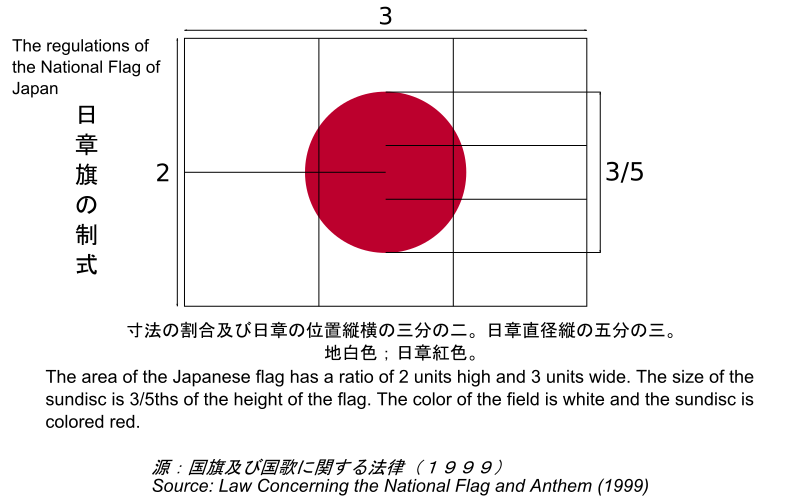
Nations and other entities have flags, and they frequently specify the layout of their flag very carefully. Can you guess which of the following versions of a Japanese flag are correct?


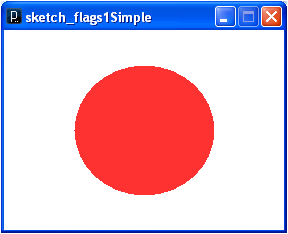

Which of these flags conforms to the specification of the Japanese flag (see http://upload.wikimedia.org/wikipedia/commons/8/80/Construction_sheet_of_the_Japanese_flag.svg)? People are pretty good at graphical discernment tasks like this one, so it’s important to have the ratios and scaling done properly. This requires the use of types, variables and expressions.
Every value has a type that denotes the range of possible values and the legal operations on that value. Processing supports a variety of types, based on Java types.
| Type | Description | Example Literal Values |
|---|---|---|
int |
integers | 42, -1 |
double |
real numbers | 3.14159, 1.0 |
char |
individual characters (delimited by single quote marks) | 'a', 'A', ' ' |
String |
sets of characters (delimited by double quotes) | "Howdy!", "testing, testing,
testing", "" |
boolean |
logical values | true, false |
In the last lab, we used literal values exclusively. This was useful to a degree, but more sophisticated programs create, manipulate and use values, which requires variables and constants. A variable is a named container for storing a changeable value. A constant is a named container for storing a unchangeable value. Both variables and constants are named using identifiers.
Identifiers are names that must start with a letter or
_ (underscore) and can be followed by any number of
characters or digits (not including spaces or special
characters). The convention is to create meaningful identifiers
that start with a lowercase letter for variables and are all
uppercase for constants. Multiple-word variable identifiers use
camelCase, no spaces and capitalizing each new word;
multiple-word constants separate words using the underscore.
| Example | Description | Pattern |
|---|---|---|
int count; |
Declares an integer variable named count |
type identifier  [ =
	  initialValue ];
The code in square braces is optional. |
String myName = "Zim"; |
Declares a String variable named myName with
initial value “Zim”. |
|
char myMiddleInitial = 'I'; |
Declares an character variable named
myMiddleInitial with value 'I'. |
|
final double PI = 3.14159; |
Declares an integer constant named
PI with value 3.14159. |
final type
	  identifier =
initialValue; |
final String MY_SALUTATION = "I am Zim"; |
Declares a String constant named
MY_SALUTATION with value "I am
Zim". |
You can manipulate values using expressions. An expression combines a sequence of objects, called operands, with a sequence of operations to return a value. The type of returned value is the type of the expression.
| Example | Return Value | Return Type | Description |
|---|---|---|---|
1 + 1 |
2 |
int |
Computes the value of 1 + 1 |
1 + 2 * 3 |
7 |
int |
Multiplication and division have higher precedence than addition and subtraction. |
(1 + 2) * 3 |
9 |
int |
Parentheses can be used to alter the default precedence. |
1/2 |
0 |
int |
Integer division - 0.5 is not the return value. |
1%2 |
1 |
int |
Integer remainder - This is the remainder when dividing 1 by 2. |
1.0/2.0 |
0.5 |
double |
Real division |
1.0 / 2.0 / 3.0 |
0.1666667 |
double |
Most operators execute from left to right (called left associativity). |
1.0 / (2.0 / 3.0) |
1.5 |
double |
Parentheses can be used to alter the default associativity. |
1.0/2 |
0.5 |
double |
Mixing compatible types, like integers and doubles, promotes the “narrower” type to the “wider” type, e.g., integers can be converted to doubles. This is called implicit type conversion. |
(int)1.5 |
1 |
int |
Values can be explicitly cast to other compatible types e.g., doubles can be cast to integers (by truncating them). This is called explicit type conversion. |
"I am " + "Zim" |
"I am Zim" |
String |
+ concatenates string values. |
2 == 3 |
false |
boolean |
Relational operators: < > <= >=
== != |
true && !false |
true |
boolean |
Logical connectives: ! (not),
&& (and), || (or) |
| Example | Expected Value | Actual Value |
|---|---|---|
| 42 | ||
| 2 + 3 * 4 | ||
| 5 / 6 | ||
| 5 % 6 | ||
| 2 / 3.0 | ||
| "Project" + "Connect" | ||
| 25 == 25 | ||
| "Zim" == "Zim" |
You can print the value of expressions in the Processing IDE using a program of the form:
println(expression);
Assignment sets a variable to a given value. For
example, the following code declares a variable i
and sets its value to 3.
int i;
i = 1 + 2;
The pattern here is:
variable = expression;
Assignment statement can be seen as expressions.
| Example | Return Value | Return Type | Side Effect |
|---|---|---|---|
int i; |
1 |
int |
Sets the integer variable i to 1. |
int i = 1; |
2 |
int |
Increments the value of i to 2. |
int i = 1; |
1 |
int |
Increments the value of i to 2. |
int i = 1; |
3 |
int |
Increments the value of
i by 2. |
Exchange the values stored in two variables - Your program should look like this:
int i = 1, j = 2;
Put your code here.
println("i = " + i + " j = " + j);
And no, you can’t just say i = 2; j =
1;. Your code should work regardless of the initial
values of i and j.
Return true if the value of i is between 90 and 100 - Your program should look like this:
And no, you can’t just sayint i = 10; println(Put your expression here.);
println(false);. Your code should work regardless
of the initial value of i.
The code used to produce the correct, scalable version of the Japanese flags above is shown here.
// the Japanese flag (see http://en.wikipedia.org/wiki/File:Construction_sheet_of_the_Japanese_flag.svg)
// kvlinden, 28april2009

int unit = 100;
int width = 3*unit, height = 2*unit;
size(width, height);
smooth();                // smooths out the pixelation of lines
background(255);
fill(188,46,46);         // an estimate of the correct shade of red
noStroke();
ellipse(width/2.0, height/2.0, 3.0/5.0*height, 3.0/5.0*height);
This program produces a regulation Japanese flag of any size
because it encapsulates the key elements of the Japanese flag
design. It uses the variable unit to establish the
base unit length of the flag from which the width and height of the display
and the size of the red circle are derived.
Processing allows you to save your creations as image files. You can do this for the Earth flag as follows:
earthFlag.gif:  |
|
size(270,180);
background(255);
If you use images, you’ll need to make them scale; see the
reference entry for image() (http://processing.org/reference/image_.html)
for details on this.
Save two screen dumps of your at different scales.
Submit all the code for your assignment program and for your flag program.