In this lab's exercise, we examine two language translation problems.
The first problem is the problem of making plural nouns, and the
second problem is converting a word from English into Pig Latin.
While they're rather different problems, both involve string
manipulation. We will have to explore the string library of
C++.
Making a noun plural usually consists of adding an 's', but sometimes there are special cases we must watch out for. Consider these examples:
| Singular noun | Plural noun |
|---|---|
| exercise | exercises |
| noun | nouns |
| word | words |
| abscess | abscesses |
| summons | summonses |
| box | boxes |
| hobby | hobbies |
| party | parties |
As for Pig Latin, there are two rules:
| English | Pig Latin | English | Pig Latin |
|---|---|---|---|
| alphabet | alphabetyay | nerd | erdnay |
| billygoat | illygoatbay | orthodox | orthodoxyay |
| crazy | azycray | prickly | icklypray |
| dripping | ippingdray | quasimodo | asimodoquay |
| eligible | eligibleyay | rhythm | ythmrhay |
| farm | armfay | spry | yspray |
| ghost | ostghay | three | eethray |
| happy | appyhay | ugly | uglyyay |
| illegal | illegalyay | vigilant | igilantvay |
| jury | uryjay | wretched | etchedwray |
| killjoy | illjoykay | xerxes | erxesxay |
| limit | imitlay | yellow | ellowyay |
| messy | essymay | zippy | ippyzay |
Directory: lab5
piglatin.h, piglatin.cpp, and
piglatin.doc implement a library for translating
into Pig Latin.translate.cpp implements a driver for translating
keyboard input from English to Pig Latin.Makefile is a makefile.gcc users need a makefile; all others
should create a project and add all of the .cpp files to
it.
Add your name, date, and purpose to the opening documentation of the code and documentation files; if you're modifying and adding to the code written by someone else, add your data as part of the file's modification history.
To solve both problems, we first look at the string library.
The string data type in C++ is implemented with a class. A class is a way for us to encapsulate both data and
actions together into one object. In a future lab, we'll look at how
we can write our own classes, but for now we'll use the classes that
C++ provides for us.
A string object is used to hold a string (or sequence)
of characters. A single character (i.e., a char) is rarely
that useful by itself, so you'll find yourself using strings
any time you need to process text.
string ObjectsWe can easily declare and initialize string objects:
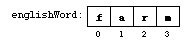
string englishWord = "farm";After the declaration,
englishWord is a string
object. A string is an indexed type, so that we can access the
individual characters in the string:
englishWord, and can
be used to access the individual characters within the string
object.
The most important thing about indexing the characters of a string is where the indexing starts:
Helpful hint: The indexing of a stringalways starts at index 0.
So the first character of the string has index 0, the second
characters has index 1, the third character has index 2, and so on up
to the last character whose index is one less than the size of
the string. Keep all of this in mind as you use indices to
access the characters and substrings of a string.
string OperationsAs mentioned above, a class encapsulates both data and actions into
one object. As a class, the string class has many operations
we can use on string objects.
An operation in a class is usually implemented as a method (also known as an instance method or a function member). A method is merely a function defined in a class. We'll see how to make these definitions ourselves in a later lab; for now all we need is the ability to call them. This requires a slightly different syntax for our function call:
In the past, we didn't have an object before the function name when we called the function; but with a method, the method must be applied to an object. Many object-oriented programmers think of methods as messages that they send to the objects. For example,obj.method(args);
int size = stringObject.size();We'd think of
stringObject receiving a message size()
which asks the object to figure out its size. In other words, "Hey,
stringObject, what's your size?" This metaphor becomes more
important when we implement classes, but it's also helpful in
mastering this new syntax for calling methods.
Let's look at some of the provided operations of the string
class. Suppose that str is a string:
| Description | Syntax | Explanation |
|---|---|---|
| Index operator | |
Returns the character at index from str.
If index is out of range for str, it will
return junk or crash your program. |
Size of string |
|
Returns the size of the string. |
Concatenation of two strings |
|
Returns a string equal to the first string
followed by the second. |
Equality of two strings |
|
Returns true if the two strings are equal,
false otherwise. |
| Substrings | |
Returns the substring starting at index start of
length size. |
| Finding characters in a string. | |
Returns the index of the first character in pattern
that it can find in str, starting at index.
If it cannot find a matching character, then it returns string::npos. |
The first three operations are pretty straightforward. Let's look at
some examples of the substr() method:
string str = "hello";
string sub1 = str.substr(0,2);
assert (sub1 == "he");
string sub2 = str.substr(3,2);
assert (sub2 == "lo");
This code compiles and executes without any problems. The last
example (involving sub2) is important because the second
argument is a size, not an index (a common mistake). Often we
have the index of the last character we want; if we also have
the index of the first character of the substring, computing the size
is simple:
size = last - first + 1This is a very important computation, and you should keep this very handy.
The find_first_of() is a little more involved. Consider this
code:
string sample = "Hello.  Nice to meet you!";
int firstIndex = sample.find_first_of(".!?", 0);
This searches sample to find the first occurrence of a
character from the pattern ".!?". It does not need to
find the entire pattern, just one of the characters from the
pattern. So, in the code above, firstIndex should be
set to 5, the index of the first period in the string.
The starting index (0 in our example) allows us to start a
search in the middle of a string. Often you'll use 0
as your starting index just like above, but we could continue our
example:
int secondIndex = sample.find_first_of(".!?", firstIndex+1);
This starts the search right after the previous search and finds the
second occurrence of one of the characters.
Question #5.1: What will be the value of secondIndex?
Question #5.2: What would be the value ofsecondIndexif we started the search atfirstIndexinstead offirstIndex+1?
Remember that it is not important to memorize a library description like this. It is important to generally know what's available in the library, where you can find the library, and (most importantly) where you can find documentation for the library (Appendix D of C++: An Introduction to Computing by Adams and Nyhoff is one place). The discussion in this section will suffice for this lab---don't memorize this, but be sure to come back to this section when working with these methods.
if StatementsIn the previous lab, we used a simple if statement. Our
functions in this lab require a more powerful if statement.
A full if statement looks like this:
if (If theBooleanExpression) {Statements1} else {Statements2}
BooleanExpression is true, then only Statements1 will be executed; otherwise (that is, if
BooleanExpression is false), then only Statements2 will be executed. We can chain two if
statements into what is known as a multi-branch if:
if (The pattern generalizes (as we'll see in the next lab). The boolean expressions are evaluated in order until the first one that evaluates to true, and then its corresponding statements are executed. If none are true, the last block of statements (which anBooleanExpression1) {Statements1} else if (BooleanExpression2) {Statements2} else {Statements3}
if test) is executed. Exactly one block of statements
is executed each time through the statement.
Examine the chart of singular and plural nouns at the beginning of this exercise. Can you pick out the rules we need?
We'll use some simple rules:
Question #5.3: For each words in the chart above, match it up with the rule that made it plural.
Seems simple enough. It also seems reasonable that a "pluralizing function" could be generally useful. So it certainly deserves a function and even a library.
Here's our behavior:
Our function should receive a singular noun. If the noun ends in "s" or "x", return the noun with "es" tacked on the end. If the noun ends in "y", return the noun with the "y" replaced with "ies". Otherwise, return the noun with "s" tacked on the end.
So far so good. It's just a transliteration of the rules. Note that the general case comes last.
Here are the objects we need:
| Description | Type | Kind | Movement | Name |
|---|---|---|---|---|
| the singular noun | string | varying | in | singularNoun |
| the index of the last character of the noun | int | varying | local | lastCharIndex |
| the last character of the noun | char | varying | local | lastChar |
| the plural noun | string | varying | in | -- |
We have a specification for our function:
Specification:In the previous lab, we used anreceive: a singular noun, astring
precondition: the noun should be singular
return: the plural version of the noun, astring
assert() statement to enforce
our precondition. We could try to enforce the precondition for
this function, but it would take a lot of work. In fact, we'd
have to implement an entire dictionary because you cannot tell
just by looking at the letters in a word if it is already plural or
not.
This is okay. Not every precondition can or should be enforced by your code. It certainly makes the code better if you can enforce your preconditions, but it's not absolutely necessary. It is absolutely necessary, however, to clearly indicate that this is a precondition for the function. If a programmer uses your function and passes in a plural word (like "nouns") and gets strange results (like "nounses") it shouldn't be a surprise to the programmer---we warned him!
Using the string operations listed above and other operations
we've seen before, here are the operations we need for this function:
| Description | Predefined? | Name | Library |
|---|---|---|---|
| receive a value | yes | parameter | built-in |
| if...then... | yes | if statement | built-in |
| get last character of string | yes | [] and size() | string |
| compare characters | yes | == | built-in |
| concatenate two strings | yes | + | string |
| extract a substring | yes | substr() | string |
| return a string | yes | return | built-in |
So, finally, we have our algorithm:
singularNoun.lastCharIndex be the size of singularNoun minus 1.lastChar be the character of singularNoun at index lastCharIndex.lastChar is 's' or 'x',
singularNoun + "es".lastChar is 'y',
base be singularNoun without the
trailing "y".base + "ies".singularNoun + "s".Let's turn to your coding of the Pig Latin translator.
Like the pluralizer, our Pig Latin translator will have certain rules to transform a word based on the contents of the word. In the case of the pluralizer, the rule we applied was determined by the last letter of the word. For your Pig Latin translator, it's the location of the first vowel.
Consider some examples:
The focal point in both rules is the first vowel. We'll define 'a', 'e', 'i', 'o', 'u', and 'y' as vowels. While 'y' is only sometimes a vowel, the rules work better if we consider it a vowel.
Let's try this behavior:
Receive an English word. Find the position of the first vowel in that word, checking that a vowel was actually present. If a vowel begins the word, then return the concatenation of the English word and "yay". Otherwise, the Pig Latin word consists of three parts (in order): (1) the portion of the English word from the first vowel to its end, (2) the initial consonants of the English word, and (3) "ay". Return the Pig Latin word.
Here are the objects that you need:
| Description | Type | Kind | Movement | Name |
|---|---|---|---|---|
| the English word | string | varying | in | englishWord |
| index of the first vowel | int | varying | local | vowelPosition |
| the Pig Latin word | code string | varying | out | piglatinWord |
| portion of the English word from its first vowel until its end | string | varying | local | lastPart |
| consonants at the beginning of the English word | string | varying | local | firstPart |
| "yay" | string | constant | local | -- |
| "ay" | string | constant | local | -- |
This gives us the following specification for our function:
Specification:receive:englishWord, astring.
precondition:englishWordshould have at least one vowel in it.
return:piglatinWord, astring.
Since this method could be useful in many places (okay, just a bit of
a stretch there), we'll use a library. Use the specification to
create a prototype for a function named EnglishToPigLatin()
in piglatin.h; copy the prototype into the documentation
file; and then add a stub for the same function in piglatin.cpp.
The rest of the design is up to you:
Question #5.4: Write out a chart outlining the operations you need for the Pig Latin translator.
Question #5.5: Write an algorithm for the Pig Latin translator.
We can code up our algorithm for the "pluralizing" algorithm like so:
string Pluralize (string singularNoun)
{
  int lastCharIndex = singularNoun.size() - 1;
  char lastChar = singularNoun[lastCharIndex];
  if ((lastChar == 's') || (lastChar == 'x'))
    return singularNoun + "es";
  else if (lastChar == 'y')
    {
      string base = singularNoun.substr (0, lastCharIndex);
      return base + "ies";
    }
  else
    return singularNoun + "s";
}
Spend some time comparing the algorithm to the code.
Question #5.6: How much time did you spend comparing the algorithm and the code?
It wasn't enough time. Spend some more time.
Now let's break this down:
Step 1 is done automatically through the parameter passing mechanism.
Step 2 uses the size() method to get the index of the last
character. Step 3 uses this index to get the last character of
singularNoun.
Step 4 is a multi-branch if statement. The conditions of the
ifs compare two chars. When we figure out what rule
we need to apply, each rule results in a string concatenation. Two
of those are quite simple, but the second one deserves a closer
examination.
Recall that the substr() method needs a beginning index and a
size of the substring. The beginning index is easy: since we want
everything but the last character (which is a 'y' we're discarding),
we need to start at index 0. It doesn't matter what's in singularNoun or how long it is, a string always begins at
index 0.
But how long is this substring? lastCharIndex is the
index of the last character. That's the character we need to avoid,
so for our substring, the previous character is the last
character of our substring. That previous character has index
lastCharIndex-1. Using the formula above, we come up
with:
This explains whysubstrsize= (lastCharIndex-1) - 0 + 1 =lastCharIndex
lastCharIndex is doing double duty as a
index into singularNoun and as a size for the
substring.
Go back one more time to compare the algorithm and the code. There's
supposed to be little thought going from the algorithm to the code.
You'll struggle with the syntax, but you don't have to get too
creative. The double use of lastCharIndex is a bit tricky,
but otherwise the two match up very well.
The trickiest operation you'll have to worry about is finding the first vowel in a word. Unlike the noun pluralizer, you cannot test a fixed position with the index operator. You have to search for it. However, read the list of operations above carefully because one of those methods (probably the one we didn't use in the pluralizer---hint! hint! hint!) will mostly solve the problem for you.
Then, extract substrings from the English word to build up the Pig Latin word. Remember to use the formula above to compute the size of a substring.
Code up your algorithm, compile, and run your program.
Test your Pig Latin translator on all of the words listed above plus others that you come up with.
As you test your function, you'll discover that your function doesn't work on all words. (This should teach you to read the entire lab before working on it!) In particular, your function has problems with words that start with 'y' (like "yellow") or that contain a 'q' in the initial consonants (like "quiet" or "squire").
Words beginning with 'y' pose a problem because we consider 'y' to be a vowel. If we didn't, words like "style" or "spry" wouldn't translate properly. It appears that we need a special case for words beginning with 'y' because then it usually works as a consonant. But this new rule isn't perfect: "Ypsilanti" begins with a 'y' vowel.
Words with a 'q' in the initial consonants also poses a problem because the 'u' after it should also be moved to the end of the word: "squire" should translate to "iresquay", not "uiresqay". This requires a special case. We can complicate the special case further if we permit English words that do not have a 'u' after a 'q'. Strictly speaking, this isn't permitted in English, but many foreign words absorbed into English have a 'q' without a 'u' right after it.
These are both cases that should be considered for a full-fledged Pig Latin translator, although we won't do them here. See Project #5.1.
Turn in a copy of your code, your answers to the questions, and sample runs of your program demonstrating that it works correctly.